This content was translated from Korean to English using AI.
Cube.dev introduction video
Cube.dev is a solution that provides powerful BI built on a semantic layer, and offers the semantic layer as open source.
Architecture
Semantic Layer Architecture
- Code-first approach (version control, structural access through the semantic layer) (composed of four core pillars: data modeling, access control, caching, and APIs)
Conceptual Architecture
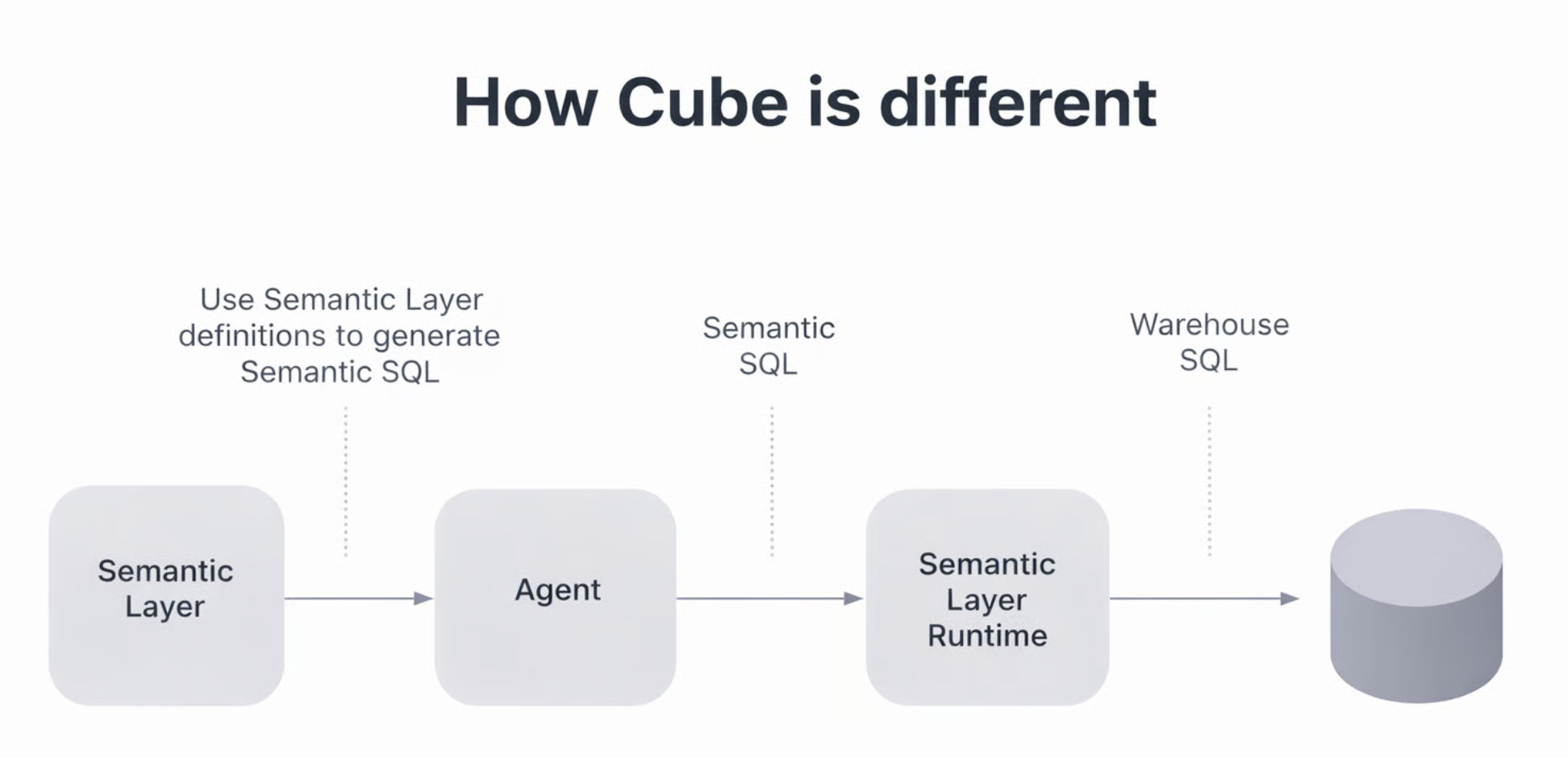
The high-level flow is as follows:
Semantic Layer - Agent - Semantic Layer Runtime - DB
- Create and register semantic layer information
- Agent generates semantic SQL through the semantic layer information (available only in the commercial solution)
- Semantic Layer Runtime converts it to DB-specific SQL
- Execute the converted SQL on the DB
Component Architecture
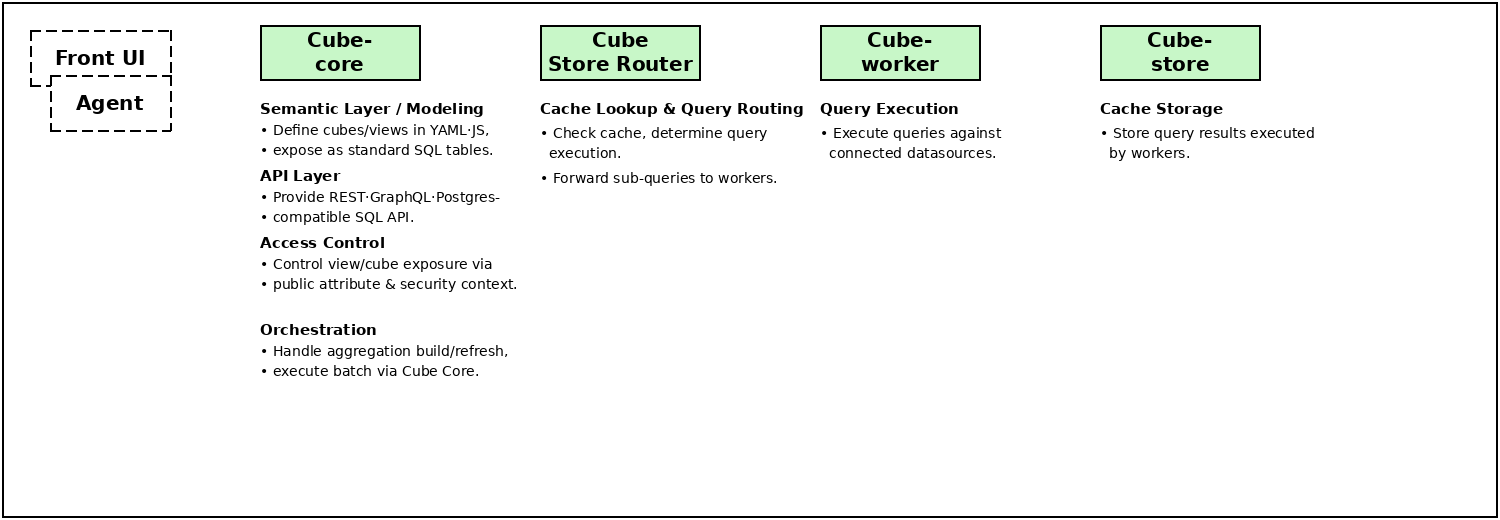
Core Features
Data Modeling
- Centralizes metric definitions, entity relationships, and business logic — dependent on the semantic layer data model
- (Defined and version-controlled in YAML or JavaScript code)
Terminology
- cube
- Represents business entities (customers, items, orders) and defines the relationships between each entity (this forms the knowledge graph that the agent uses to explore data)
- view
- Creates interfaces for data consumers to interact with (final data products for AI agents, BI users, and apps), data graphs based on cubes
APIs
APIs enable AI agents, applications, and tools to interact with the semantic layer through standard protocols (using REST, GraphQL, and SQL standards).
- REST, GraphQL
- Provides API interfaces for building custom applications
- SQL
- BI tools, visualization platforms, and data applications query SQL data sources
- (Once a data source that can connect to Cube is linked, data is accessed based on the semantic source — the Semantic Layer Runtime contains the logic to convert semantic queries to DB queries.)
Key REST APIs Provided by Cube-core
- Query registered cube metadata
- Query actual data
- Query conversion
- Standard SQL → Cube SQL
- Cube SQL → Standard SQL
Cube.dev REST API: https://cube.dev/docs/product/apis-integrations/core-data-apis/rest-api/reference#example
## Query registered data
curl -H "Authorization: TOKEN" -G http://localhost:4000/cubejs-api/v1/meta
## Query actual data
curl -H "Authorization: TOKEN" -G --data-urlencode 'query={"measures":["users.count"]}' http://localhost:4000/cubejs-api/v1/load
### Request with http method POST
### Use POST to fix problem with query length limits
curl -X POST -H "Content-Type: application/json" -H "Authorization: TOKEN" --data '{"query":{"measures":["users.count"]}}' http://localhost:4000/cubejs-api/v1/load
## Query conversion
### Standard SQL -> Cube SQL
curl -X POST -H "Authorization: TOKEN" -H "Content-Type: application/json" -d '{"query": "SELECT 123 AS value UNION ALL SELECT 456 AS value UNION ALL SELECT 789 AS value"}' http://localhost:4000/cubejs-api/v1/cubesql
### Cube SQL -> Standard SQL
curl -H "Authorization: TOKEN" -G --data-urlencode 'query={"measures":["orders.count"]}' --data-urlencode 'format=rest' http://localhost:4000/cubejs-api/v1/sqlAccess Control
- All data consumption passes through a single managed checkpoint (defined in Python or JavaScript) → This ensures that AI agents and human users equally comply with security policies.
Caching
- Defines pre-aggregations in the model as rollup tables containing measures and dimensions, caching semantic layer query results
- Stores pre-aggregations in Cube Store, Cube’s dedicated caching engine, by querying the warehouse and saving results in the background for delivery.
What is a Semantic Layer?
Dictionary Definition
A Semantic Layer is an intermediate translation layer that converts complex raw data into terms that are familiar and meaningful to business users.
→ A layer where DB, table, and column information along with primary keys and relationships to other tables are organized and stored.
Raw Data
CREATE TABLE items (
    item_code      VARCHAR(50),
    original_item_name     TEXT,
    category          VARCHAR(100),
    item_name      VARCHAR(255),
    food_type         VARCHAR(100),
    capacity_calories VARCHAR(100),
    ingredients       TEXT,
    nutrition_facts   TEXT,
    allergy_info      TEXT,
    manufacturer      VARCHAR(255),
    report_number     VARCHAR(100),
    remarks           TEXT,
    PRIMARY KEY (item_code, original_item_name)
);
Meaningful Terms (Business entities — e.g., customers, items, orders — defining relationships between each entity)
cubes:
- name: users
  sql_table: users
  title: "User Data"
  description: >
    The base table containing information about users who have signed up for the service.
    Based on user creation date, organization, and country information,
    it can be used for analyzing user growth trends, user distribution by organization, and user analysis by country.

  joins:
  - name: organizations
    sql: "{CUBE}.organization_id = {organizations.id}"
    relationship: many_to_one

  dimensions:
  - name: organization_id
    sql: organization_id
    type: number
    title: "Organization ID"
    description: "Unique identifier for the organization the user belongs to"
    primary_key: true
    meta:
      synonyms: ["company_id", "org_code", "organization", "org_id"]
      filterable: true
      sortable: true

  - name: created_at
    sql: created_at
    type: time
    title: "User Signup Date"
    description: "The date and time when the user signed up for the service"
    meta:
      synonyms: ["signup_date", "creation_date", "registration_date", "join_date"]
      filterable: true
      sortable: true

  - name: country
    sql: country
    type: string
    title: "Country"
    description: "Country information registered by the user"
    meta:
      synonyms: ["nationality", "region", "country_name", "user_country"]
      filterable: true
      sortable: true

  measures:
  - name: count
    type: count
    sql: id
    title: "Total User Count"
    description: "Aggregates the total number of registered users."
    meta:
      synonyms: ["user_count", "member_count", "total_members", "num_users"]