This content was translated from Korean to English using AI.
Conclusion
Register and manage everything through LakeFormation Data Lake Locations.
Background
One of the biggest challenges while operating an AWS data lake environment was how to share data.
As the organization grew, accounts were separated (Multi Account), and the teams producing and consuming data diverged. Managing
“how much access to grant” and
“who accesses what and how” became increasingly difficult.
I have experienced various data sharing approaches over time,
and after considerable trial and error, the pros and cons of each method became clear.
Before systematizing a data sharing approach that fits our company’s situation,
I wanted to first organize and review the concepts and selection criteria.
Goal
Understand the permission check flow during data queries and identify where permission issues occur.
Understand the various data sharing methods and the flow of each.
Be able to evaluate and select the appropriate data sharing method.
Explanation
Types and Criteria for Data Sharing Methods
The “data” referred to here means tables registered in the Glue Catalog (schema or table data).
The choice depends on “what to share” and “how much to control.”
Manage primarily through LakeFormation (LF) and handle exceptions separately for the best results.
In an AWS data lake environment, data sharing can be broadly divided into three approaches:
1. Quick data file sharing only: S3/IAM
2. Sharing schema and tables: Glue Data Catalog
3. (Recommended) Skip the above and share and manage everything at once: LakeFormation
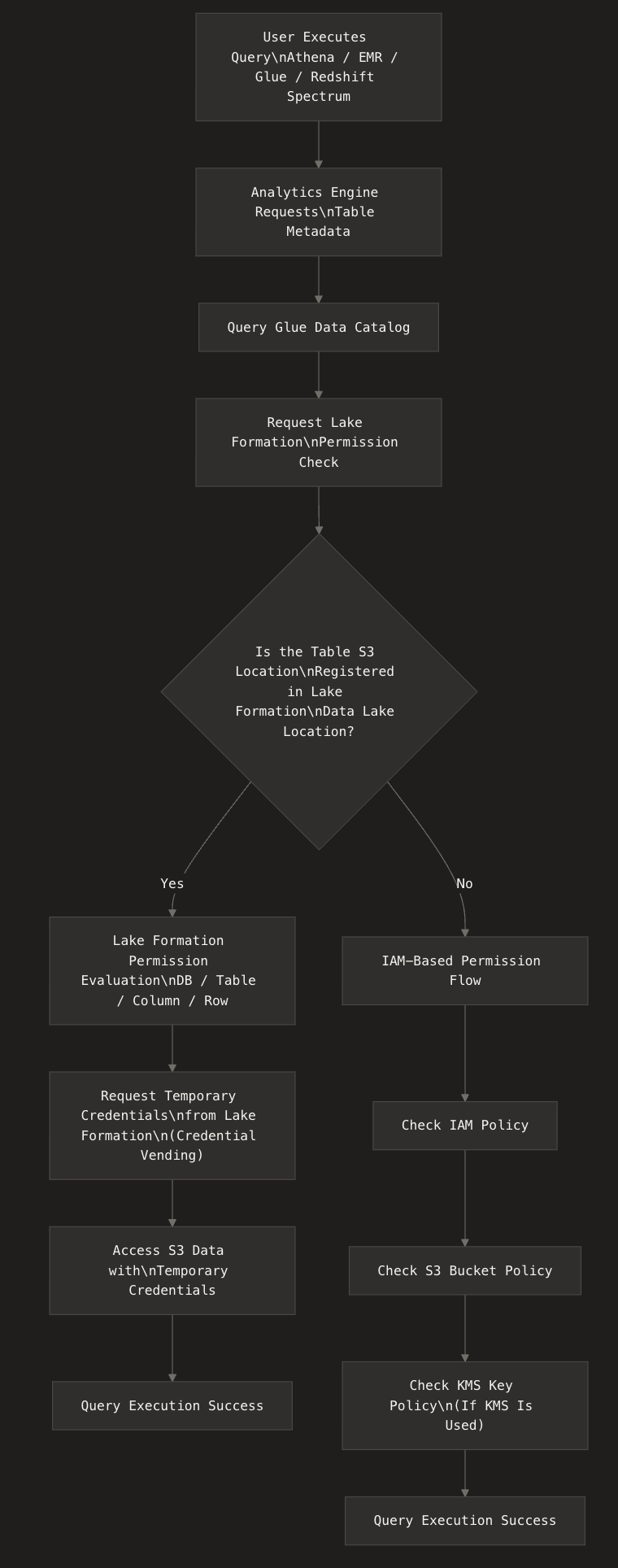
Permission Check Flow During Data Queries
The high-level flow is as follows:
User Data Queries
- Accessing tables via Athena queries- Glue ETL reading Catalog tables as input- EMR/Redshift Spectrum referencing Catalog tables- Accessing Catalog tables via boto3 through Athena, Glue, EMR, Redshift
What it means to manage with Lake Formation...
Registering S3 data locations (bucket/prefix) as Data Lake Locations in Lake Formation
The Lake Formation permission model applies to Glue Data Catalog objects (databases/tables) that point to the registered S3 locations
Lake Formation assumes the IAM role specified during registration and issues temporary credentials (credential vending) to integrated services (Athena/EMR/Glue, etc.)
Subdirectories under the registered path are included in the management scope
With Hybrid access mode, you can gradually transition by applying LakeFormation permissions to only some databases/tables in the Data Catalog
Understanding Through Examples
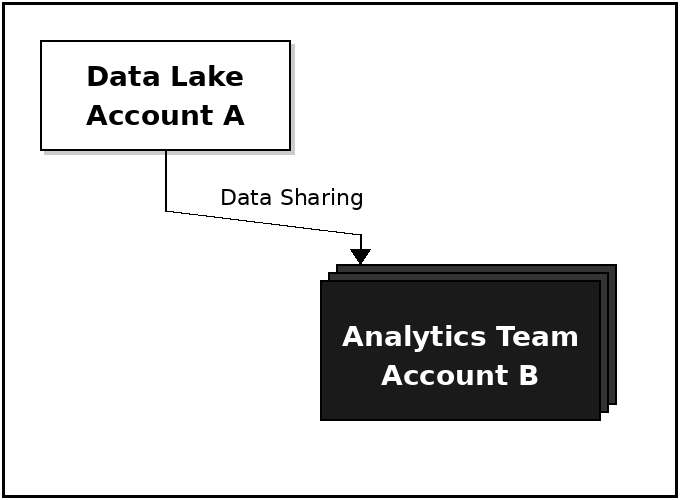
Example Scenario
Producer / Data Lake Account A
Stores data in S3
Manages metadata in Glue Data Catalog
Consumer / Analytics Team Account B
Uses shared data via Athena/Glue/ETL, etc.
Quick Data Sharing Only: S3 / IAM
The most basic approach, sharing only the S3 objects themselves.
Characteristics
Grants S3 access via bucket policies + consumer account IAM permissions
The consumer account must create tables manually for the metadata of the shared data
Glue Catalog metadata is not shared
Things to Be Aware Of
Best suited for quickly granting data access, but
Since only data is shared, schema synchronization requires Glue Crawler or other supplementary measures.
Detailed Implementation Flow
1. Producer (Account A)- Identify the S3 bucket/prefix to share- Add Consumer (Account B) access permissions to the bucket policy- (If encryption is used) Add Consumer permissions to the KMS Key policy2. Consumer (Account B)- Grant S3 Read permissions to the IAM Role/User- Create tables manually in Glue Data Catalog or generate schema via Crawler- Start querying via Athena/Glue/EMR using the created tables
Sharing Schema and Tables: Glue Data Catalog
A method that shares not only data but also table definitions (schema).
Characteristics
Set resource policies on the data-owning account’s Glue Data Catalog
The consumer account registers it as an external DataCatalog in Athena
Tables can be queried in the format ownerCatalog.db.table
Things to Be Aware Of
After Glue Catalog permission verification,
- S3 access is checked separately via S3/IAM policies
Detailed Implementation Flow
1. Producer (Account A)- Determine the target DB/tables to share- Add Consumer (Account B) permissions to the Data Catalog Resource Policy- Identify the S3 bucket/prefix to share- Add Consumer (Account B) access permissions to the bucket policy2. Consumer (Account B)- Grant Glue permissions received from Account A to the Consumer IAM Role/User- Register the external Data Catalog in Lake Formation- Query in the format producerCatalog.db.table
Skip the Above and Share and Manage Everything at Once with LF: LakeFormation (Recommended)
An approach that leverages Data Lake Locations in Lake Formation, a dedicated data lake governance service.
Characteristics
Permission management at the DB/table level
Row-level and column-level access control available
Requires AWS RAM invitation acceptance + Resource Link creation
Advantages
Enables policy-centric data access management
Granular control at the account/role/user level
Detailed Implementation Flow
1. Producer (Account A)- Review existing Glue tables Check DB/tables for the S3 paths to register- Register Lake Formation Data Lake Location Select S3 path Specify IAM Role for LF to assume Check Hybrid access mode if needed (Hybrid access mode: keep existing IAM access vs. separate LF-governed targets)- Grant DB/table permissions in Lake Formation Grant to Consumer account/ORG/OU- Create AWS RAM sharing invitation Send resource sharing invitation to the Consumer account- (If using Hybrid) Configure opt-in for LF-governed targets "Make LF Permissions effective immediately" option available2. Consumer (Account B)- Accept the invitation in the AWS RAM console- Create a Resource Link in Lake Formation- Grant Resource Link permissions Describe (Resource Link) Grant on target (source resource)- Delegate permissions to internal Consumer IAM Roles/Users (If using Hybrid) Configure opt-in settings